


In early April, Google once again tightened its requirements for mobile versions of websites. Your SEO specialist now has to clear a higher bar to reach the high scores you want in Google PageSpeed Insights.
If you are not sure what this Google service is and why it matters, keep reading. In this article, we explain which marketing techniques and lines of code can hurt your web project’s reputation in Google’s eyes and what you can do to fix the situation. We also run an experiment: we test popular live chat widgets and their impact on website loading speed, since these online assistants are now almost everywhere. Then pick the least resource-intensive option.
What PageSpeed Insights is and why people fear it
PageSpeed Insights (GPSI) is a Google service that measures how fast web pages load. It scores websites on a scale from 0 to 100 and offers recommendations for improvement in the areas where it finds problems.
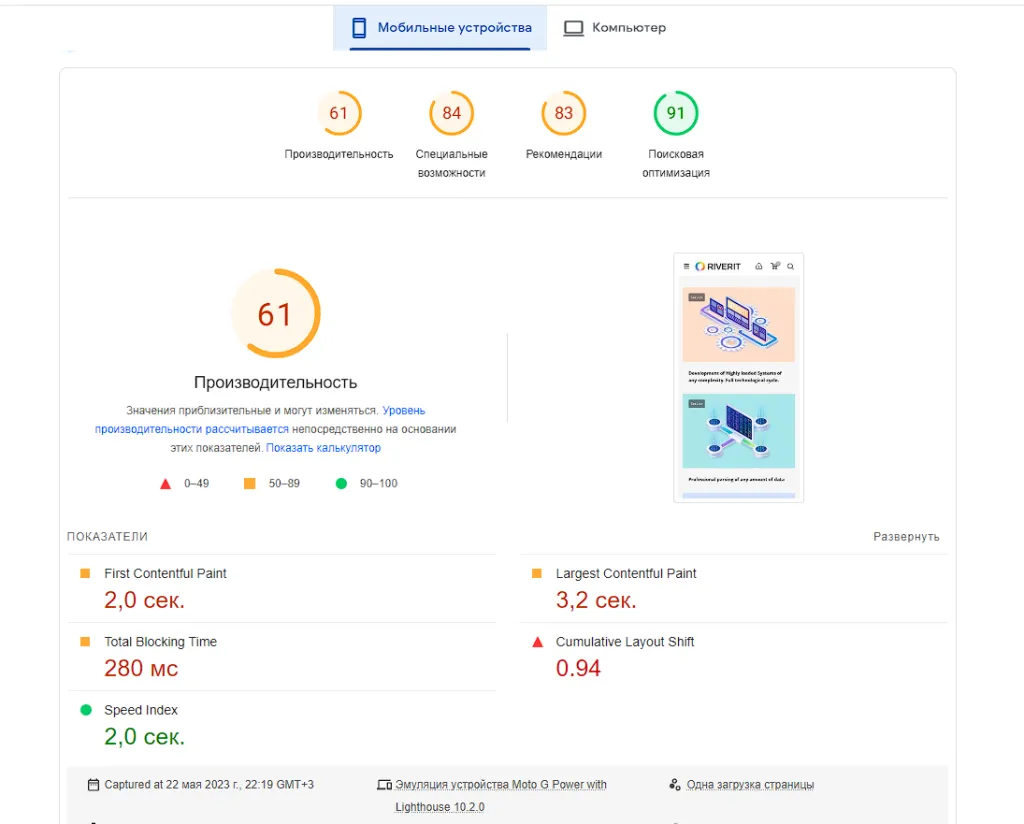
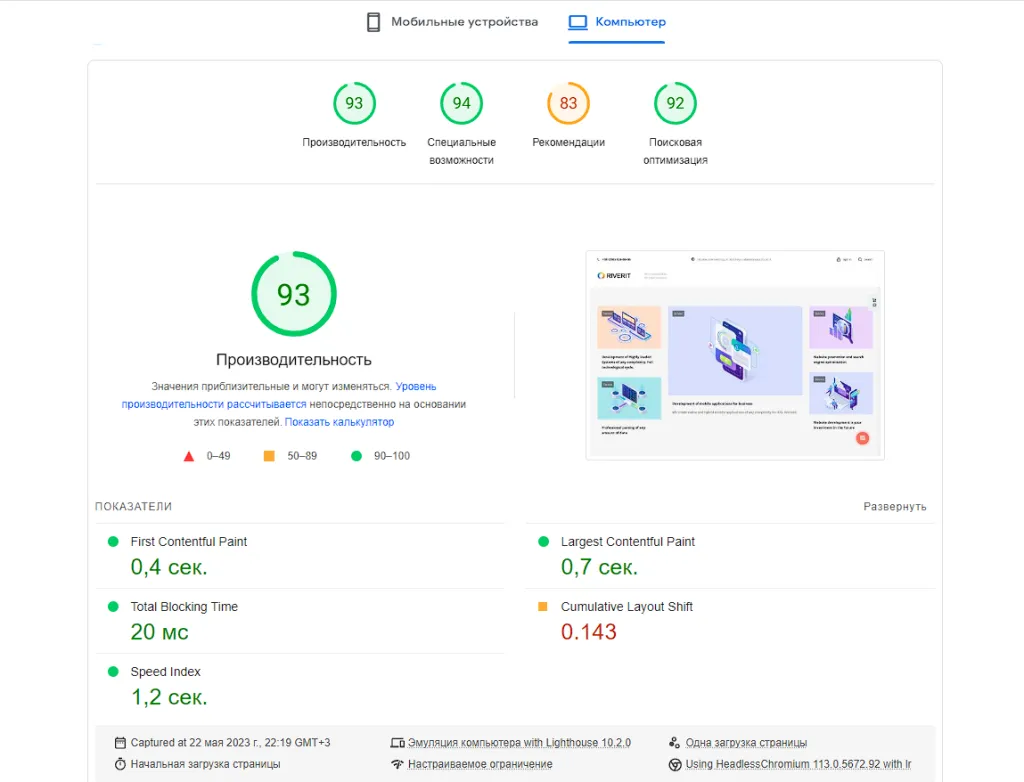
Here is what each metric is for:
- First Contentful Paint is the time between the start of page loading and the moment the first image or text block appears.
- Speed Index shows how quickly the page content becomes visible.
- Largest Contentful Paint is the time it takes to render the largest element in the initial viewport: an image or a text block.
- Total Blocking Time is how long the page does not respond to user actions after the first paint because scripts are running.
- Cumulative Layout Shift is how much page elements move around during loading.
Web developers have mixed feelings about GPSI (you can test a project ten times and get results that differ by ±15 points). But Google does not really care: website speed according to this service affects search rankings, so for most website owners and SEO specialists this score becomes one of the most important metrics.
What affects speed in PageSpeed Insights
Total JavaScript size
Even if the desktop version of your website works perfectly, completely different rules apply to the mobile version: 1 second of waiting for scripts on a PC can turn into 5 on a mobile device. The worst part is that it can be quite hard to find out which script is slowing down the page.
The various user behavior analytics tools that SEO specialists and marketers love so much pull in lots of scripts. This increases page weight and lowers the website’s overall GPSI score (moving it into the yellow or red zone).
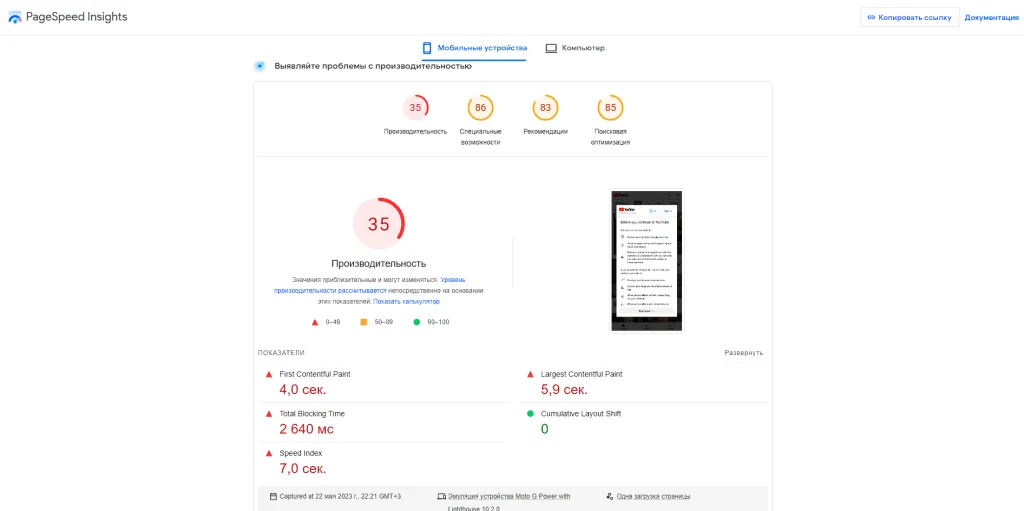
Embedding YouTube videos with <iframe>
Even if a video does not autoplay when the page loads, it still adds to the page weight. If a page has several such videos, you can lose 30–40 points off the overall loading speed score right away.
Plugins and animated elements
Many plugins can make a web page much heavier and worsen its GPSI scores. Sliders, which web designers adore, are a good example. If a page has more than two of them, ending up in the yellow zone is almost inevitable. It gets worse if the design calls for each of the 20 products on a catalog page to have its own slider with three images that switch on hover. If one such slider takes, say, 0.3 seconds to load, you can safely multiply the load time of the whole catalog page by 20.
Using Google Tag Manager
Google Tag Manager is a Google tool for managing the JavaScript and HTML tags used for tracking and analytics on websites. For example, these can be callback request widgets, analytics trackers, chats and other tools that marketers love. It can bundle a large number of third-party scripts, and the more of them there are, the lower your GPSI score. So think carefully before installing 10 such “trackers” on one project at once.
Live chats
They behave differently, but all of them slow down page loading to some extent, because they load their own scripts, as well as images and emojis. One possible solution is to load the page first and then load the chat script after the page has fully loaded (although this can cause problems too).
Speeding up your site to reach the “green zone”
Use a CDN
This can help reduce load time for users who are far from your server, although this technology is not a universal solution.
Use AMP
Some people believe that Google put special emphasis on loading speed to promote its Accelerated Mobile Pages (AMP) project (where only Google ads are allowed). However, this assumption has not been confirmed 🙂
Compress images
This is a basic rule for content managers that, unfortunately, many ignore. Lossless image compression reduces file size. You can use services such as TinyPNG or Optimizilla for this.
Use images in WebP format
This is a modern format developed by Google, and its files are smaller than PNG and JPEG. You can convert images to this format with the Online-Convert service.
Use the ngx_pagespeed module
This module from Google means you do not have to compress images by hand or convert them to the right format. It speeds up the website and reduces page load time by automatically applying the latest web performance optimization techniques to pages and their related resources (CSS, JavaScript, images), without requiring changes to existing content or workflow.
Besides optimizing images, the module can rewrite HTML, defer loading of JavaScript and images, extend cache lifetime and much more. Note: the PageSpeed project was discontinued in March 2023, its repository was archived in April 2025, and the module is no longer updated.
Use caching headers for static resources
These headers for images, scripts and styles tell the browser that these resources will not change for a certain period of time and do not need to be downloaded every time.
Reached the “green zone”: time to celebrate?!
Google’s John Mueller once noted that focusing on technical aspects (such as high loading speed) does not guarantee high rankings in search results. It is important to look at the website as a whole: the content also has to be improved so that it is relevant and useful for users. Other tips from experienced SEO specialists include improving usability, integrating voice search and avoiding pop-ups and intrusive ads.
The sooner you find a problem, the easier it is to solve. Qualified developers test projects in Google PageSpeed Insights not when they hand over the final code, but during development, when it is easier to find and fix a problem. If you leave it until after the project is finished and the team has moved on, it can cost you a pretty penny.